Appearance
New Relic
Pre-requisites
- Full Platform User
Finding your New Relic API Key and Data Center Region
You'll now be prompted to add the API Key and Data Center Region.
API Key
- To find the
API Key. Sign in to your New Relic account. - Select
Profile>API Keys>Create a key.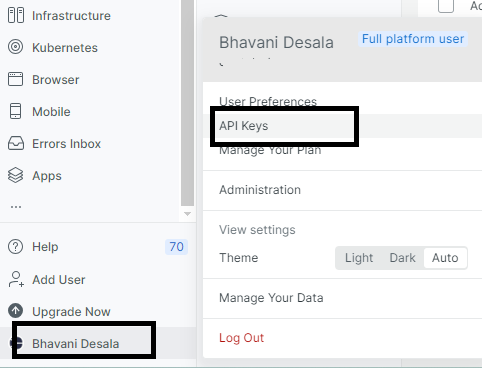
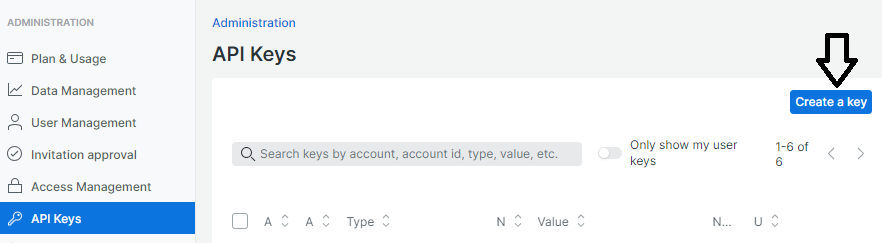
- Enter a new key name, select User for the Key type, add an optional description, and click Save.
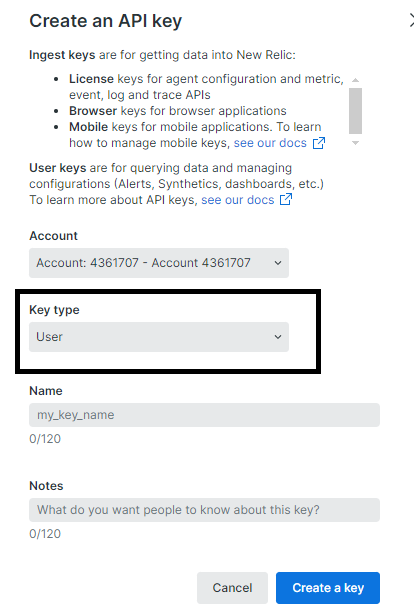
- Copy the API Key and paste it in the relevant field in Truto.
Data Center Region
- To find the
Data Center Region. Sign in to your New Relic account. - You will find the Datacenter Region from the New Relic website URL in your browser as shown in the image below.
